VAMPIR portraits guide: Restoration and Materials
VAMPIR portraits guide covering restoration stages, cumulative stat bonuses, material sources, weekly shops, random crafting boxes, and collection priorities.
Last reviewed:
Official game media
VAMPIR imagery from the official game website and publisher resources.
Visit official websiteRestore portraits with their matching materials to gain permanent character stats, and complete all 10 restoration stages to unlock a portrait as your profile image. Portrait progression applies to your current character, so do not treat it as an account-wide collection shared across characters. This guide covers the basic restoration process; check the portrait interface and shop listings in your version before planning purchases around specific limits or further progression.
How portrait restoration and stat bonuses work
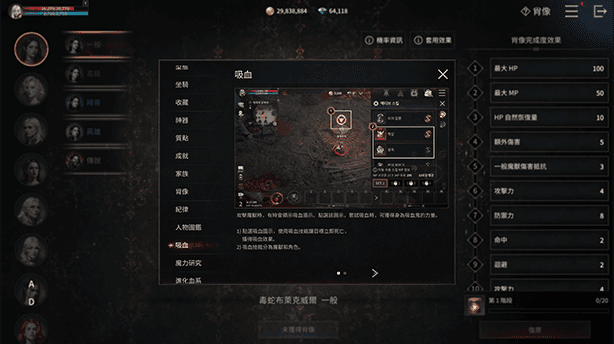
Each portrait has its own attributes and requires specific restoration agents, so the material you collect needs to match the portrait you want to improve. The basic restoration process has 10 stages, with additional stats becoming available as you advance toward a fully restored portrait. Restoration itself has no enhancement failure chance: collecting the required materials and spending the necessary resources gives the corresponding progress.
Activated portrait bonuses accumulate, and you do not have to display a particular portrait to retain the benefits of its restoration progress. Use the portrait interface to check your total accumulated bonuses when reviewing what your collection already contributes to your character. This separates your profile-image choice from your stat gains: completing a portrait unlocks its image, while bonuses activated through other portraits still contribute.
Start with class portraits and Abyss of Creation
The walkthrough introduces five class portraits as accessible starting points because their restoration materials can be obtained through regular gameplay. The official class page lists Akasha, Carnage, Bloodstained, Viper, and Grim Reaper; use those class names to orient yourself when reviewing the portraits. For collection planning, begin by comparing the class portraits visible in your interface with the matching materials you already have.
Abyss of Creation is a normal dungeon identified as a daily source with a chance to drop materials for those class portraits. A separate player walkthrough also describes using the jar-like materials obtained there to raise portrait stats, supporting its role as a restoration-material source. Include it among your regular sources, but treat each run as an opportunity for materials rather than a guaranteed drop or a fixed amount of daily progress.
Check the gold shop and other regular rewards
Class portrait materials are also described as available through the gold shop, archives, character codex, and certain other rewards, including achievements. The walkthrough recommends checking the gold shop daily and making portrait-material purchases a regular habit when your gold income allows it. Read the offer shown in your version before buying, since the daily quantities discussed in the walkthrough should not be treated as a confirmed current global-server allowance.
The gold-purchased kits described in the walkthrough are distributed between different class portraits, so their restoration progress will not necessarily stay equal. That distribution is a reason to assess what each batch actually lets you restore, rather than planning as though every purchase advances one selected portrait. When materials already enable a useful bonus on another portrait, compare that opportunity with the cost of continuing your preferred portrait before committing more resources.
Review weekly coin exchanges before spending
The Eternal Coin Shop and Clan Coin Shop are identified as exchange sources for particular portrait materials, with weekly purchase limits. For the eternity-related currency, the walkthrough points to dungeon activities and daily activities, and identifies a Coin of Eternity Merchant in town. Check that merchant's relevant portrait offers and the allowance displayed in your version instead of relying on an assumed quantity, level requirement, or universal shop list.
For clan-related resources, the walkthrough recommends joining an active clan and participating in clan activities to create more opportunities to obtain them. These currencies also buy other progression items, so a portrait exchange competes with upgrades elsewhere on your character. Reserve what you need for important current upgrades, then decide how much to allocate to portrait materials while taking the weekly purchase limits into account.
Look beyond routine dungeons for remaining materials
Not every portrait is tied to routine dungeon farming or the same shop, so review other activities when planning further restoration. The walkthrough lists world boss participation, achievements, ranking rewards, competitive content, and clan battles among sources connected to portrait materials. Check the reward information for the activity you are considering before pursuing a particular portrait, because this list does not establish which material each activity awards or what participation earns it.
The black market is another source of restoration kits, with the walkthrough describing a weekly reset and a process involving item donations, currency, and exchanges. Review the available exchanges there as an additional route for materials, alongside the dungeon, shop, and activity sources you already use. Its role as an extra source does not establish that every portrait can be completed through the black market, so compare its actual offers with your remaining restoration requirements.
Distinguish reliable restoration from random boxes
Crafting can provide mysterious portrait restoration kit boxes containing materials for different portraits, including some described as otherwise difficult to obtain. The rewards from those boxes are random, so a portrait appearing in the reward pool does not mean its materials will be easy to obtain. Treat these boxes as a possible additional source when reviewing your options, rather than a guaranteed way to finish the particular portrait you are targeting.
This randomness concerns what materials the boxes award, while the restoration process itself grants progress when you spend its required resources. Keeping those steps separate helps you evaluate a collection plan: having a way to obtain a box is different from already holding the materials for your next restoration stage. The walkthrough therefore recommends focusing first on materials obtained reliably and regularly, then progressing toward portraits linked to more demanding activities.
Choose useful upgrades and distinguish special collectibles
When choosing what to restore next, compare the portrait's stats, its required materials, and how easily you can obtain those materials. The walkthrough favors activating a useful bonus with resources already available over spending heavily to advance a more expensive portrait. Use that as a decision method for your own collection rather than a universal class ranking, and avoid rushing to spend diamonds simply to complete a restoration stage earlier.
The walkthrough also distinguishes a special pre-registration collectible portrait from the normal restoration system that provides permanent combat stats. That event collectible should be evaluated separately from your regular restoration goals, and its appearance in the walkthrough does not establish that it can still be claimed. For ordinary portraits, the supported completion milestone remains finishing the basic restoration stages to unlock the profile image, with your activated stat bonuses accumulating across the portraits you restore.
Next Steps
Discipline guide
Use this VAMPIR Discipline guide to choose stats, manage engraving locks and spend Trinity, with Korean advice and global-version limits explained.
Magic Research guide
Use this VAMPIR Magic Research guide to choose flasks, find Magic Orbs, plan Trinity spending, and understand research risks and regional version limits.
Need Help?
Check the official website and community for account support and current game announcements.
Official websiteOfficial DiscordRelated Guides
Gear enhancement priorities
Follow VAMPIR gear enhancement priority with weapon-first spending, reported safe upgrade caps, material sources, and advice on keeping or trading gear.
Official download routes
Start your VAMPIR download with official PC, App Store, Google Play and Epic links, plus installation steps, PC requirements and Netmarble Connect setup.